

Restaurant agent (API)
Build a voice agent that handles restaurant orders, reservations, and outbound marketing campaigns.
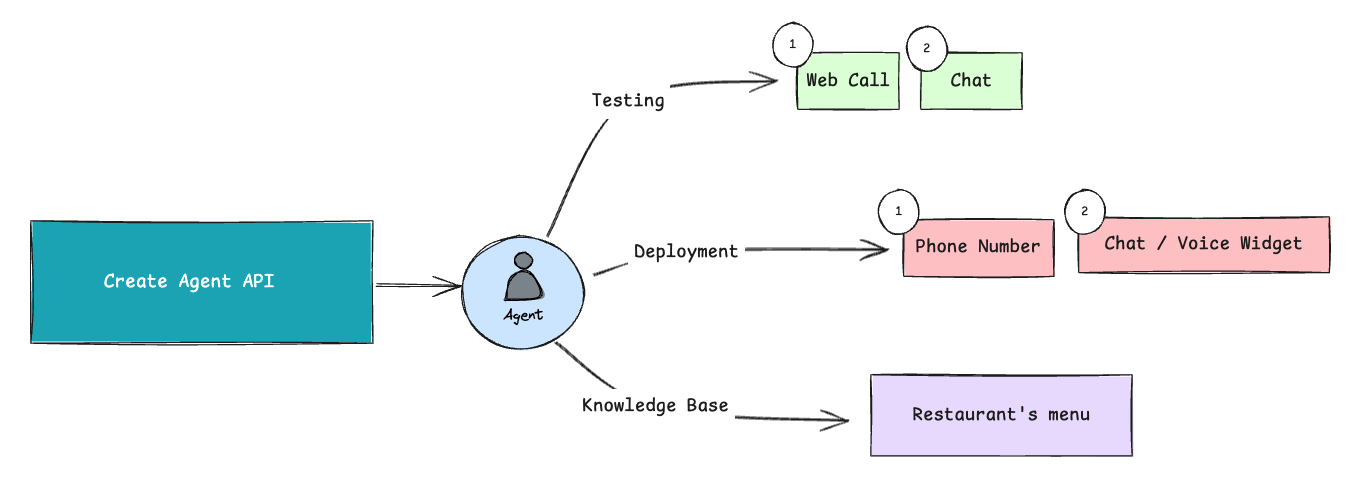
Build a restaurant voice agent end to end with the OmniDimension Python SDK. The agent takes inbound orders from a menu, confirms delivery details, and dispatches outbound promotional calls.
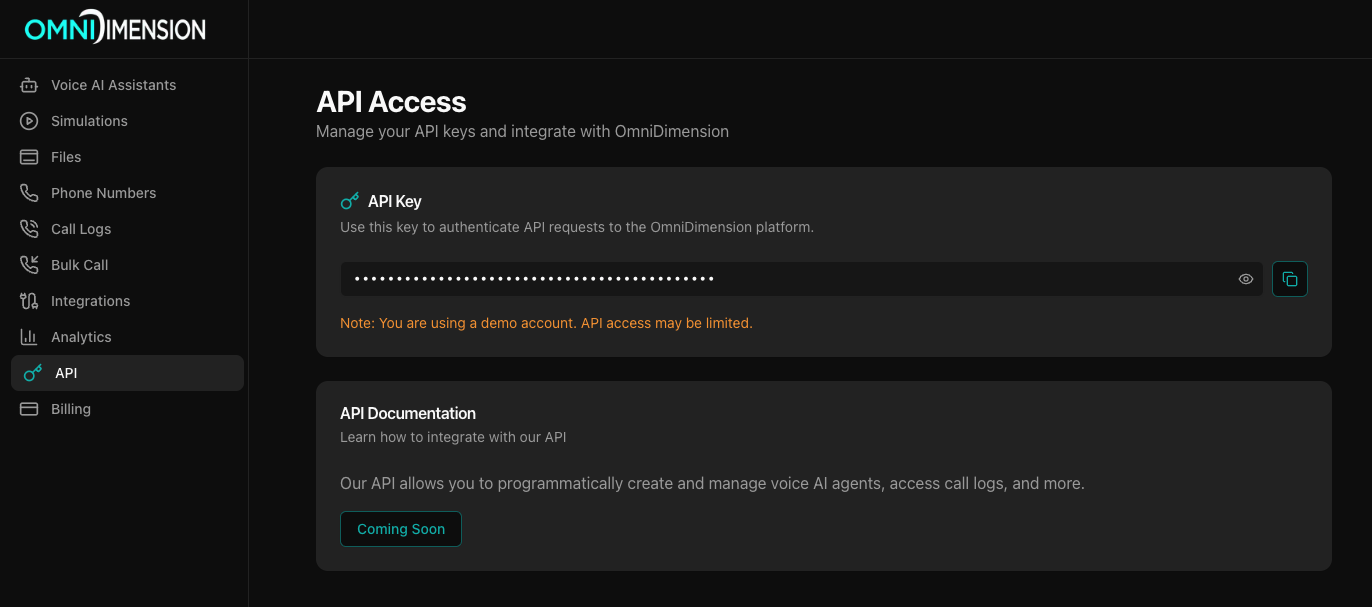
Create the restaurant assistant
Start by creating your voice agent with restaurant-specific configuration.
from omnidimension import Client

client = Client("your_api_key_here")

restaurant_agent = client.agent.create(
    name="Arnav - Restaurant Assistant",
    welcome_message="Namaste! This is Arnav from Spice Garden Restaurant. I'd be happy to take your order for authentic North Indian cuisine. How may I help you today?",
    context_breakdown=[
        {
            "title": "Restaurant Menu",
            "body": """APPETIZERS: Vegetable Samosas ₹120 | Paneer Tikka ₹220 | Chicken Tikka ₹250 | Aloo Chaat ₹150

MAIN COURSES: Butter Chicken ₹320 | Palak Paneer ₹280 | Dal Makhani ₹240 | Chicken Curry ₹300 | Lamb Biryani ₹380

BREADS & RICE: Plain Naan ₹50 | Garlic Naan ₹70 | Butter Naan ₹60 | Basmati Rice ₹80 | Vegetable Biryani ₹220

BEVERAGES: Lassi ₹80 | Masala Chai ₹40 | Fresh Lime Soda ₹60"""
        },
        {
            "title": "Order Process",
            "body": "1. Greet customer warmly 2. Take complete order with quantities 3. Confirm items and total 4. Collect delivery address 5. Ask for payment preference 6. Provide order confirmation and estimated delivery time"
        },
        {
            "title": "Restaurant Policies",
            "body": "Delivery available within 5km radius. Minimum order ₹200. Free delivery above ₹500. Payment methods: Cash on delivery, UPI, Card. Standard delivery time: 30-45 minutes."
        }
    ],
    call_type="Incoming",
    voice={
        "provider": "eleven_labs",
        "voice_id": "JBFqnCBsd6RMkjVDRZzb"
    },
    model={
        "provider": "anthropic",
        "model": "gpt-4o-mini",
        "temperature": 0.7
    }
)

agent_id = restaurant_agent["json"]["id"]
print(f"Restaurant agent created with ID: {agent_id}")
Key components:
welcome_message: first impression when customers call- Menu context: complete menu with prices in Indian Rupees
- Order process: step-by-step workflow for handling orders
- Restaurant policies: delivery rules and payment options
- Voice configuration: natural-sounding voice
Upload menu knowledge base
Enhance your agent's knowledge by uploading your restaurant's menu PDF.
import base64

def upload_restaurant_menu(agent_id, menu_pdf_path):
    """Upload menu PDF to knowledge base and attach to agent"""

    # Read and encode the PDF file
    with open(menu_pdf_path, "rb") as file:
        file_data = base64.b64encode(file.read()).decode('utf-8')

    # Upload to knowledge base
    kb_response = client.knowledge_base.create(file_data, "Restaurant_Menu.pdf")
    file_id = kb_response["json"]["file"]["id"]

    # Attach to agent
    attach_response = client.knowledge_base.attach([file_id], agent_id)

    print(f"Menu uploaded successfully. File ID: {file_id}")
    return file_id

# Upload your restaurant menu
menu_file_id = upload_restaurant_menu(agent_id, "restaurant_menu.pdf")
Handle incoming customer calls
Your agent is now ready to handle incoming calls. When customers call your restaurant number, the agent will:
- Greet customers with the welcome message
- Present menu options based on customer preferences
- Take detailed orders with quantities and special requests
- Calculate totals including taxes and delivery charges
- Collect delivery information and confirm address
- Ask for payment preference (cash, UPI, card)
- Provide confirmation with estimated delivery time
Dispatch outbound marketing calls
Reach out to customers with promotional offers.
def launch_marketing_campaign(agent_id, customer_list, offer_message):
    """Launch outbound marketing calls to customer list"""

    # Update agent for marketing calls
    marketing_message = f"Hello! This is Arnav from Spice Garden Restaurant. {offer_message} Would you like to place an order today?"

    client.agent.update(
        agent_id,
        welcome_message=marketing_message,
        call_type="Outgoing"
    )

    # Dispatch calls to customers
    call_results = []
    for customer_phone in customer_list:
        try:
            call_response = client.call.dispatch_call(
                agent_id=agent_id,
                to_number=customer_phone,
                call_context="Marketing campaign - Special dinner offer"
            )
            call_results.append({
                "phone": customer_phone,
                "status": "dispatched",
                "call_id": call_response.get("call_id")
            })
        except Exception as e:
            call_results.append({
                "phone": customer_phone,
                "status": "failed",
                "error": str(e)
            })

    return call_results

# Launch dinner special campaign
dinner_customers = [
    "+919876543210",
    "+919876543211",
    "+919876543212"
]

offer_text = "We have a special 20% discount on our dinner combo meals today!"
campaign_results = launch_marketing_campaign(agent_id, dinner_customers, offer_text)

print("Marketing campaign launched:")
for result in campaign_results:
    print(f"{result['phone']}: {result['status']}")
Monitor performance and analytics
Track your restaurant agent's performance.
def get_restaurant_analytics(agent_id, days=7):
    """Get comprehensive analytics for restaurant agent"""

    # Get recent call logs
    call_logs = client.call.get_call_logs(agent_id=agent_id, page_size=100)
    calls_data = call_logs.get('data', [])

    # Calculate metrics
    total_calls = len(calls_data)
    successful_calls = sum(1 for call in calls_data if call.get('status') == 'completed')
    average_duration = sum(call.get('duration', 0) for call in calls_data) / total_calls if total_calls > 0 else 0

    # Generate report
    analytics_report = {
        "period_days": days,
        "total_calls": total_calls,
        "successful_calls": successful_calls,
        "completion_rate": f"{(successful_calls/total_calls*100):.1f}%" if total_calls > 0 else "0%",
        "average_call_duration": f"{average_duration:.1f} seconds",
        "recent_calls": calls_data[:5]  # Last 5 calls
    }

    return analytics_report

# Get weekly performance report
weekly_report = get_restaurant_analytics(agent_id, days=7)

print("Restaurant Agent Performance Report")
print(f"Total Calls: {weekly_report['total_calls']}")
print(f"Successful Calls: {weekly_report['successful_calls']}")
print(f"Completion Rate: {weekly_report['completion_rate']}")
print(f"Average Call Duration: {weekly_report['average_call_duration']}")
Update agent configuration
Modify your agent settings as needed.
def update_agent_details(agent_id, **kwargs):
    """Update agent configuration"""
    response = client.agent.update(agent_id, **kwargs)
    print(f"Agent updated successfully")
    return response

# Update welcome message for dinner hours
update_agent_details(
    agent_id,
    welcome_message="Good evening! Welcome to Spice Garden Restaurant. Our dinner specials are ready! How can I help you?"
)

# Switch back to incoming calls after marketing campaign
update_agent_details(
    agent_id,
    call_type="Incoming"
)
Complete setup
Here's the complete setup for a production-ready restaurant agent.
from omnidimension import Client
import base64

class RestaurantVoiceAgent:
    def __init__(self, api_key):
        self.client = Client(api_key)
        self.agent_id = None

    def setup_complete_restaurant_agent(self):
        """Set up a complete restaurant voice agent with all features"""

        # Create the main agent
        agent = self.client.agent.create(
            name="Spice Garden - Voice Assistant",
            welcome_message="Namaste! Welcome to Spice Garden Restaurant. I'm here to help you with orders, reservations, and any questions. How can I assist you today?",
            context_breakdown=[
                {
                    "title": "Full Menu & Pricing",
                    "body": """
                    APPETIZERS: Veg Samosas ₹120 | Paneer Tikka ₹220 | Chicken Tikka ₹250 | Fish Tikka ₹280 | Aloo Chaat ₹150

                    MAIN COURSES: Butter Chicken ₹320 | Palak Paneer ₹280 | Dal Makhani ₹240 | Chicken Curry ₹300 | Lamb Biryani ₹380 | Fish Curry ₹300

                    BREADS: Plain Naan ₹50 | Garlic Naan ₹70 | Butter Naan ₹60 | Roti ₹30 | Kulcha ₹60

                    RICE: Basmati Rice ₹80 | Veg Biryani ₹220 | Jeera Rice ₹100

                    BEVERAGES: Sweet Lassi ₹80 | Salted Lassi ₹80 | Masala Chai ₹40 | Fresh Lime ₹60 | Cold Coffee ₹90

                    DESSERTS: Gulab Jamun ₹100 | Rasmalai ₹120 | Kulfi ₹80
                    """
                },
                {
                    "title": "Service Guidelines",
                    "body": "Always be warm and helpful. Suggest popular combinations. Inform about cooking time for special requests. Confirm orders clearly before processing. Handle complaints with empathy."
                },
                {
                    "title": "Operational Details",
                    "body": "Operating hours: 11 AM - 11 PM daily. Delivery radius: 5km. Minimum order: ₹200. Free delivery above ₹500. Estimated delivery: 30-45 minutes. Payment: Cash, UPI, Cards accepted."
                }
            ],
            call_type="Incoming",
            voice={
                "provider": "eleven_labs",
                "voice_id": "JBFqnCBsd6RMkjVDRZzb"
            },
            model={
                "provider": "anthropic",
                "model": "gpt-4o-mini",
                "temperature": 0.7
            }
        )

        self.agent_id = agent["json"]["id"]
        print(f"Restaurant agent created: {self.agent_id}")

        return self.agent_id

    def get_performance_summary(self):
        """Get a quick performance summary"""
        if not self.agent_id:
            return "No agent configured"

        calls = self.client.call.get_call_logs(agent_id=self.agent_id, page_size=50)
        total_calls = len(calls.get('data', []))

        return {
            "agent_id": self.agent_id,
            "total_calls_handled": total_calls,
            "status": "Active and ready for orders!"
        }

    def upload_menu_pdf(self, menu_pdf_path):
        """Upload menu PDF to knowledge base"""
        if not self.agent_id:
            print("Please create agent first")
            return None

        with open(menu_pdf_path, "rb") as file:
            file_data = base64.b64encode(file.read()).decode('utf-8')

        kb_response = self.client.knowledge_base.create(file_data, "Restaurant_Menu.pdf")
        file_id = kb_response["json"]["file"]["id"]

        self.client.knowledge_base.attach([file_id], self.agent_id)
        print(f"Menu PDF uploaded: {file_id}")
        return file_id

# Initialize and deploy restaurant agent
restaurant = RestaurantVoiceAgent("your_api_key_here")
agent_id = restaurant.setup_complete_restaurant_agent()

print("\nYour restaurant voice agent is now live!")
print(f"Agent ID: {agent_id}")
Key features
Order management
- Complete menu with prices and descriptions
- Order taking through natural conversation
- Menu recommendations and suggestions
- Order confirmation with customer details
Call handling
- Incoming customer calls for orders
- Outbound marketing and promotional calls
- Natural Hindi/English conversation flow
- Professional restaurant service experience
Analytics and monitoring
- Call volume tracking
- Call completion rates
- Average call duration
- Detailed call logs and history
Knowledge base
- Upload menu PDFs for enhanced knowledge
- Attach multiple documents to your agent
- Comprehensive menu and policy information
- Easy knowledge management
Agent management
- Update agent configuration anytime
- Switch between incoming and outgoing modes
- Modify welcome messages and context
- Real-time agent performance monitoring