

Receive messages
A one-time setup per number so customer WhatsApp messages reach OmniDimension and your agent can reply.
Connecting a number lets you send. To receive customer messages, and let your agent reply, Meta has to forward them to OmniDimension. It's a one-time setup per number, and it also carries WhatsApp calls.
- 1.Sends a messageOpens the 24-hour window
- 2.Forwards itNeeds Receive messages set up
- 3.Agent writes the replyOr your team, if they took the chat over
- 4.Sends the reply from your number
- 5.Delivers itRead ticks come back the same way
Where to find it
Right after connecting, click Receive messages on the Connected screen. Later, click Not receiving messages · Set up on the number card. Then pick one of two methods.
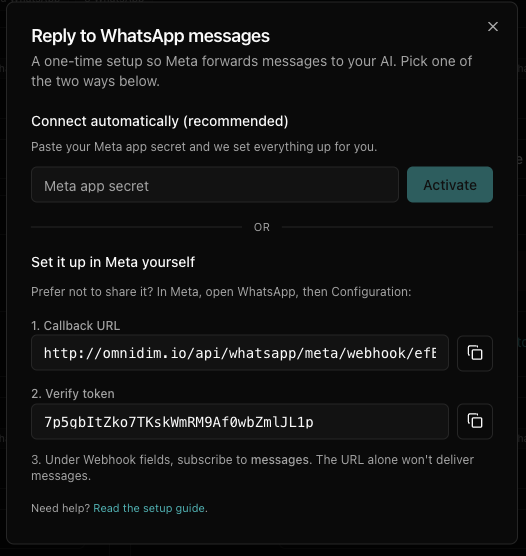
Method 1: Connect automatically (recommended)
Copy your Meta app secret
In the Meta App Dashboard, open App settings → Basic and click Show next to App secret. Copy it.
Paste it and activate
Paste it into Meta app secret and click Activate. You see Receiving messages. Everything else, calls included, is set up for you.
Method 2: Set it up in Meta yourself
Prefer not to share your app secret? Keep OmniDimension open on Set it up in Meta yourself so you can copy the Callback URL and Verify token, and open the Meta App Dashboard in another tab.
Open your app's WhatsApp settings
- In the sidebar, click Use cases.
- Next to Connect with customers through WhatsApp, click Customize.
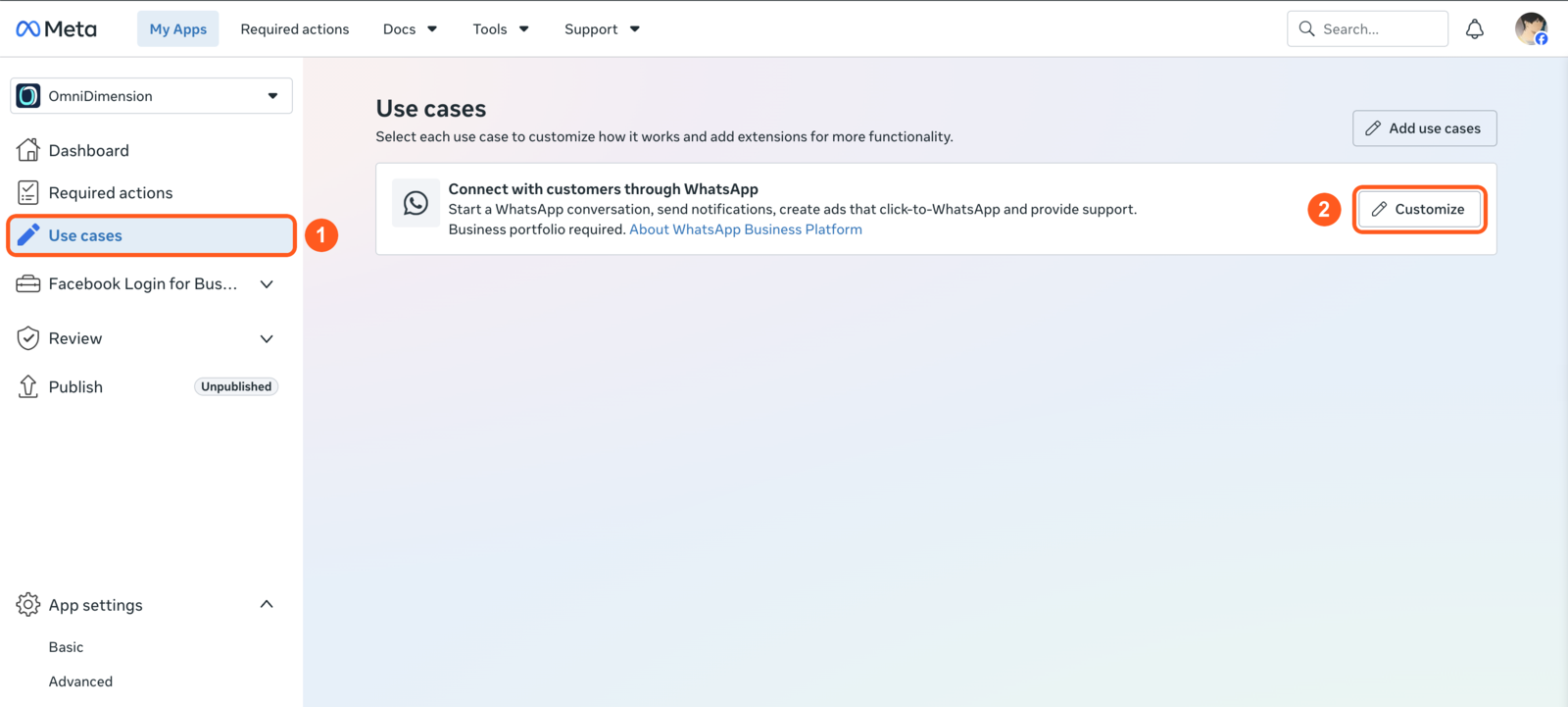
Older apps show WhatsApp → Configuration in the sidebar instead. Don't use App settings → Advanced: its "Authorize callback URL" is for Facebook Login.
Add the callback and subscribe
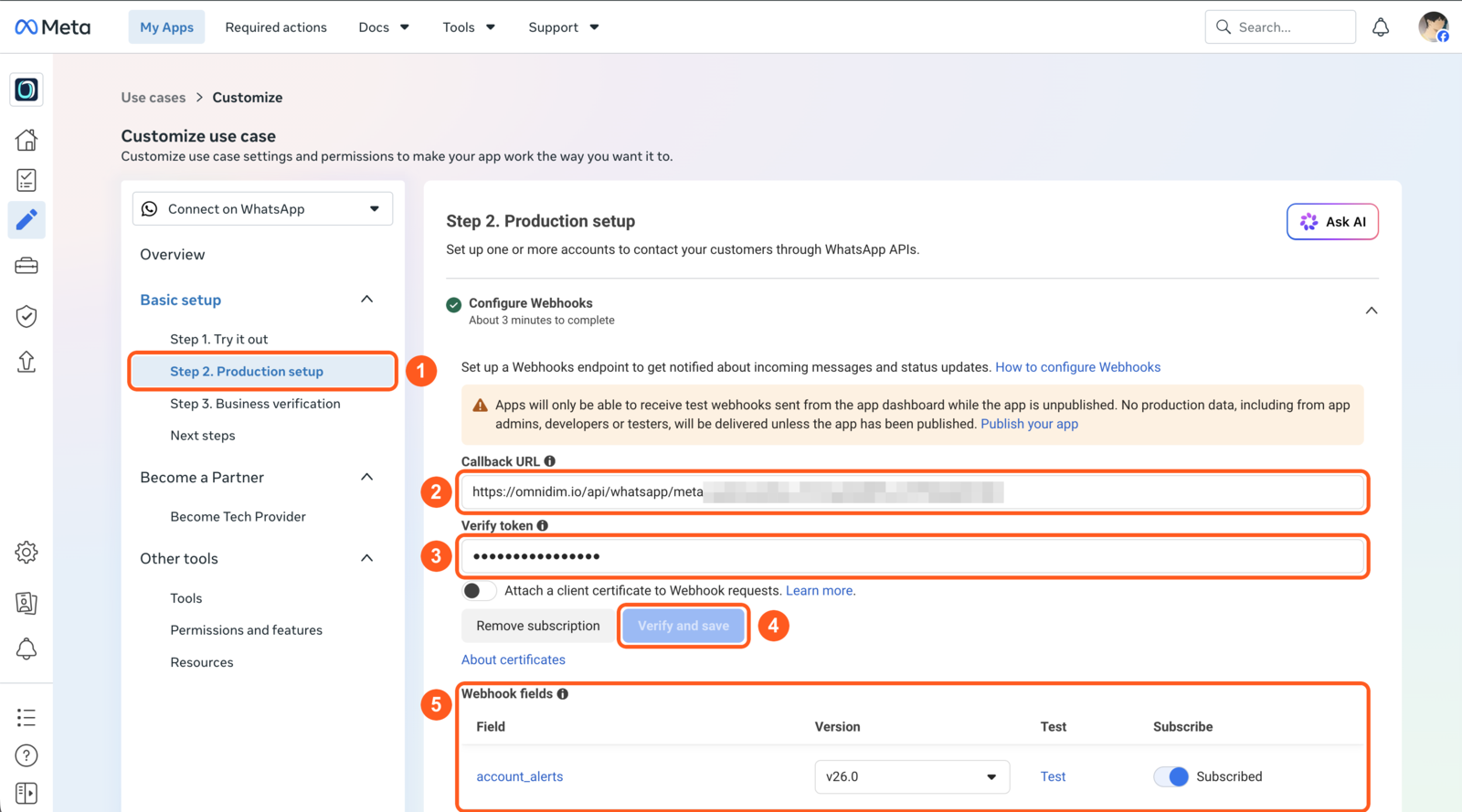
- Open Step 2. Production setup and find Configure Webhooks.
- Paste the Callback URL from OmniDimension.
- Paste the Verify token.
- Click Verify and save.
- Scroll to Webhook fields and turn on Subscribe for:
- messages (required)
- calls, if you'll use WhatsApp calls
- account_update, so a restriction on your account shows in OmniDimension
Good to know
- To stop the agent replying, turn off Agent replies. This setup stays.
- If activation fails, the reason shows under the form. See error codes.
Was this page helpful?
Connect a number
Connect a WhatsApp Business number to OmniDimension with your WhatsApp Business account ID and a permanent Meta access token, then register it and pick the numbers to import.
Agent replies
Choose the agent that answers a WhatsApp number, turn its replies on or off, and change how its replies feel to customers.