

SIP Trunking
Connect your existing phone numbers to OmniDimension using SIP trunking.
SIP (Session Initiation Protocol) trunking lets you use phone numbers you already own with your OmniDimension AI agents. You point your carrier at us, import the number, and it starts taking calls. This page walks through the import, the carriers we support, and how to authenticate by IP.
Getting started
Importing a SIP number takes a few clicks. Before you start, make sure you have:
- A SIP-enabled phone number from your carrier
- Your SIP credentials (username and password), or a carrier that authenticates by IP
- Access to your carrier's configuration panel
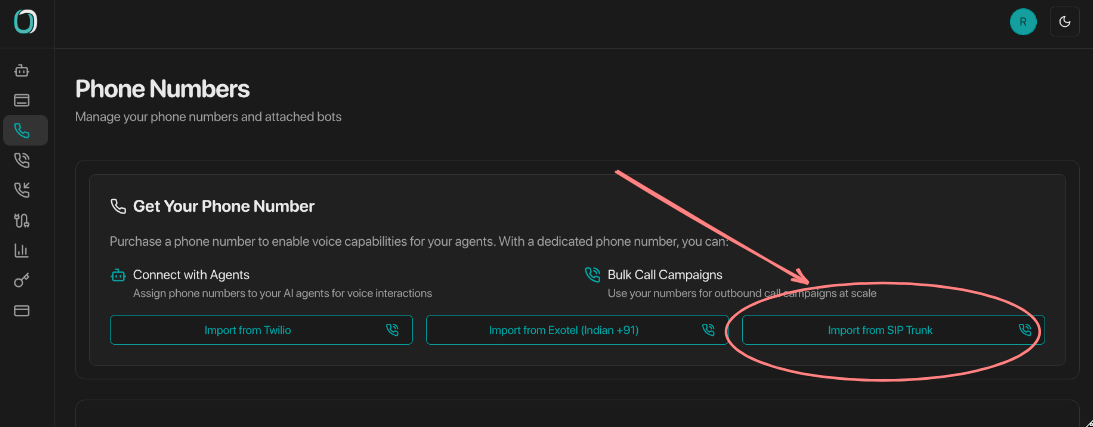
Enter your provider details
Pick your provider from the dropdown and enter your credentials. For a carrier that isn't listed, choose Other / Unknown and enter your SIP host and credentials by hand.
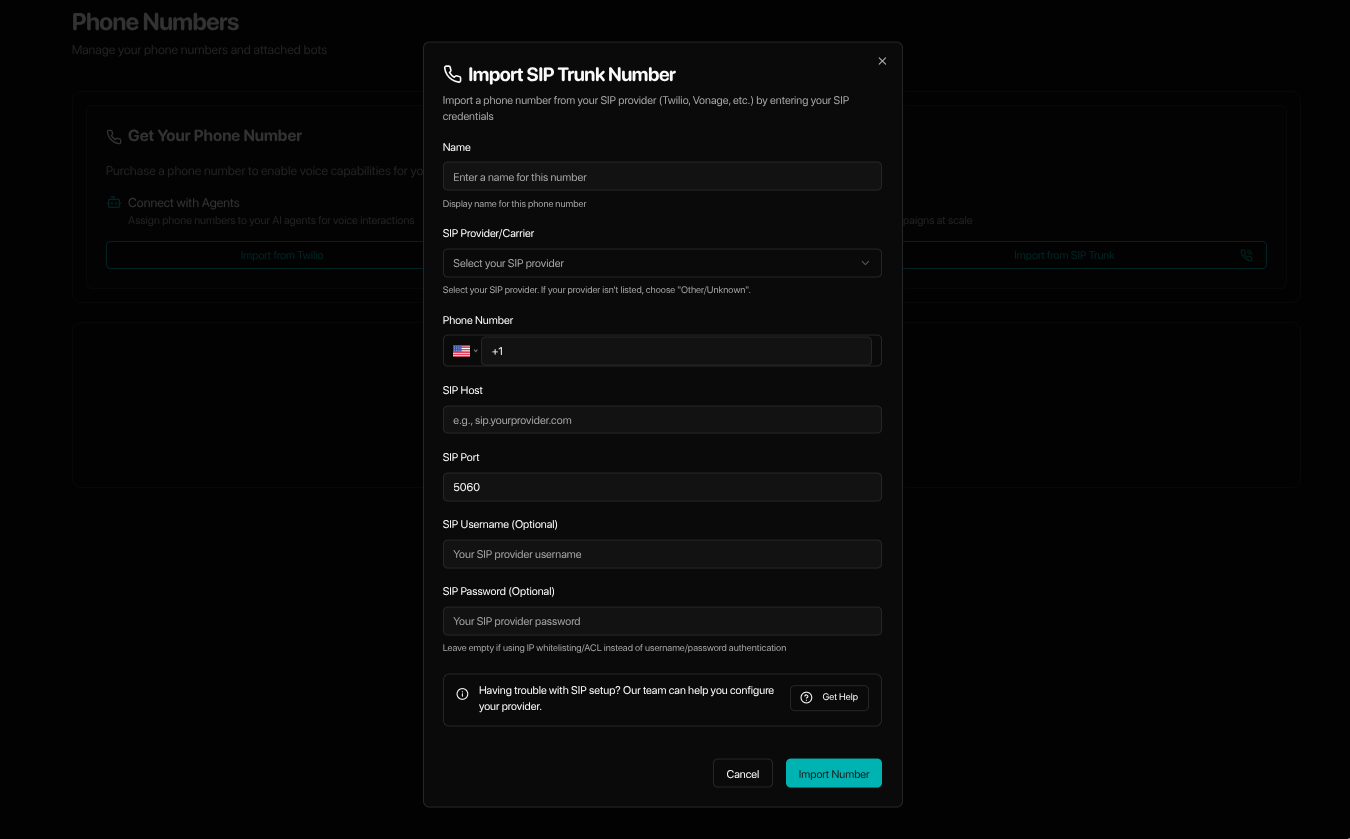
Import and go live
Submit the form. For the guided providers, the connection is configured for you and the number is ready to take calls right away.
Supported providers
You can bring a number from any SIP carrier. These four have guided imports with a step-by-step page for each:
Twilio
Elastic SIP Trunking with credential lists or IP ACL authentication.
RingCentral
SIP configuration with optional outbound proxy setup.
Vonage
SIP trunking with UserKey / Secret authentication and regional hosts.
Voicelink
Shared-trunk setup with host, port, and dial prefix filled in. Just enter your DID, no credentials needed.
Allow our SIP server (recommended)
The simplest way to connect a trunk is to allow our SIP server on your carrier. Most carriers need nothing else, so SIP credentials are optional.
-
Allow this host and port:
sip.omnidim.io, port5091(UDP or TCP), or port5061if your carrier connects over TLS -
If your carrier's access list only accepts a literal IP (Twilio's IP ACL, for example), resolve the host and enter the address it returns:
dig +short sip.omnidim.io
If your carrier uses a username and password instead, add them under Credentials at the bottom of the import dialog.
Outbound number format
This sets how the numbers your agent calls are sent to your carrier. It applies to every outbound call and transfer on the trunk. The import dialog shows it as one line, with the exact number your carrier will receive for a sample call. Most carriers, including Twilio, Vonage and RingCentral, need no change. Choose Change only if your carrier asks for a different format.
| Format | A call to +91 98765 43210 is sent as | Use it when |
|---|---|---|
| International | +919876543210 | Your carrier accepts standard numbers (most do) |
| International without + | 919876543210 | Your carrier rejects a leading + |
| Local number | 9876543210 | Your carrier wants numbers without the country code. It removes the code of whichever country you call, so use it only when the trunk calls one country |
A dial prefix is extra digits your carrier asks for in front of every number, such as a routing or account code. It is added before the number and nothing else changes:
| Format | Dial prefix | Sent as |
|---|---|---|
| International without + | 45454 | 45454919876543210 |
| Local number | 45454 | 454549876543210 |
| Local number | 0 | 09876543210 |
Troubleshooting
The import didn't go through
- Double-check your SIP credentials and confirm your carrier allows outbound calls
- Check your account balance and that your plan includes SIP trunking
The number imported but calls don't connect
- Verify your SIP trunk settings and that your plan covers outbound calls to your target regions
- Review the call logs in your carrier's dashboard, and confirm SIP trunking is enabled on their side
FAQs
Was this page helpful?